
For most people trying to learn how to do something new, showing tops reading. This is why short videos in YouTube and other video services continue to grow in popularity compared with long, step-by-step written procedures.

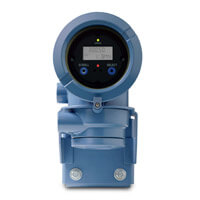 The Micro Motion 1700 and 2700 field and integral mount transmitters are designed for compact integral mounting or mounting on a wall or pipe stand. The transmitter housing is rated for use in up to Class I, Division 1 / Zone 1 hazardous locations.
James opens explaining the various elements in the display including the status LED color indications. Red indicates a critical alarm where immediate attention is required. A yellow status means information or operational status that should be monitored. Green indicates all is well. When the status is blinking red or yellow, it means the alarm has yet to be acknowledged.
He demonstrates a series of steps using the scroll and select buttons to acknowledge all alarms or to look at them individually and acknowledge them per alarm.
You can connect and interact with other flow measurement experts in the Flow group in the Emerson Exchange 365 community.