
Process manufacturing plants today are responsible for a dizzying array of intelligent instrumentation. As sensing technology has become simultaneously more powerful and more affordable, it sometimes feels as though every facility is bristling with new devices on every asset.
While these intelligent devices give us more visibility into what is happening in the field—a critical enabler of digital transformation—they also increase the responsibility of reliability personnel. Monitoring, managing, and maintaining device health can be complex and time-consuming, especially for the lean teams typical of today’s plants.
For years, organizations have navigated this complexity using AMS Device Manager—the most powerful software on the market for managing intelligent field devices. The software is so ubiquitous in process manufacturing operations that many users think they know all it has to offer. But do they? I’d like to share a few features of AMS Device Manager you may not know about—features you can likely put to use in your own plant today.
Alert Configuration exporting
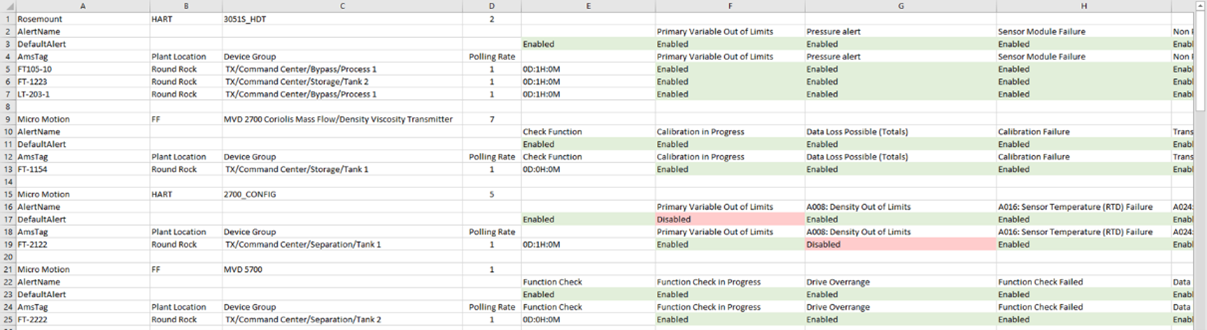
AMS Device Manager includes a feature to export alert configurations, empowering reliability personnel to generate a plant-wide list of all devices monitored in Alert Monitor, along with their specific Failed, Maintenance, and Advisory alert settings. Armed with this data in a consolidated view, users can know which alerts are currently enabled or disabled and can compare configurations across all devices. Devices are grouped by type, and enriched with detailed headings such as manufacturer, protocol, device revision, configured alerts, and default settings.
Device View
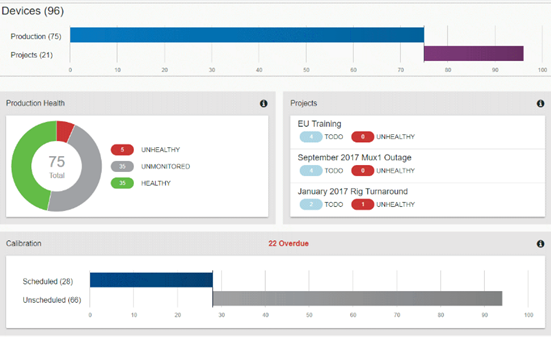
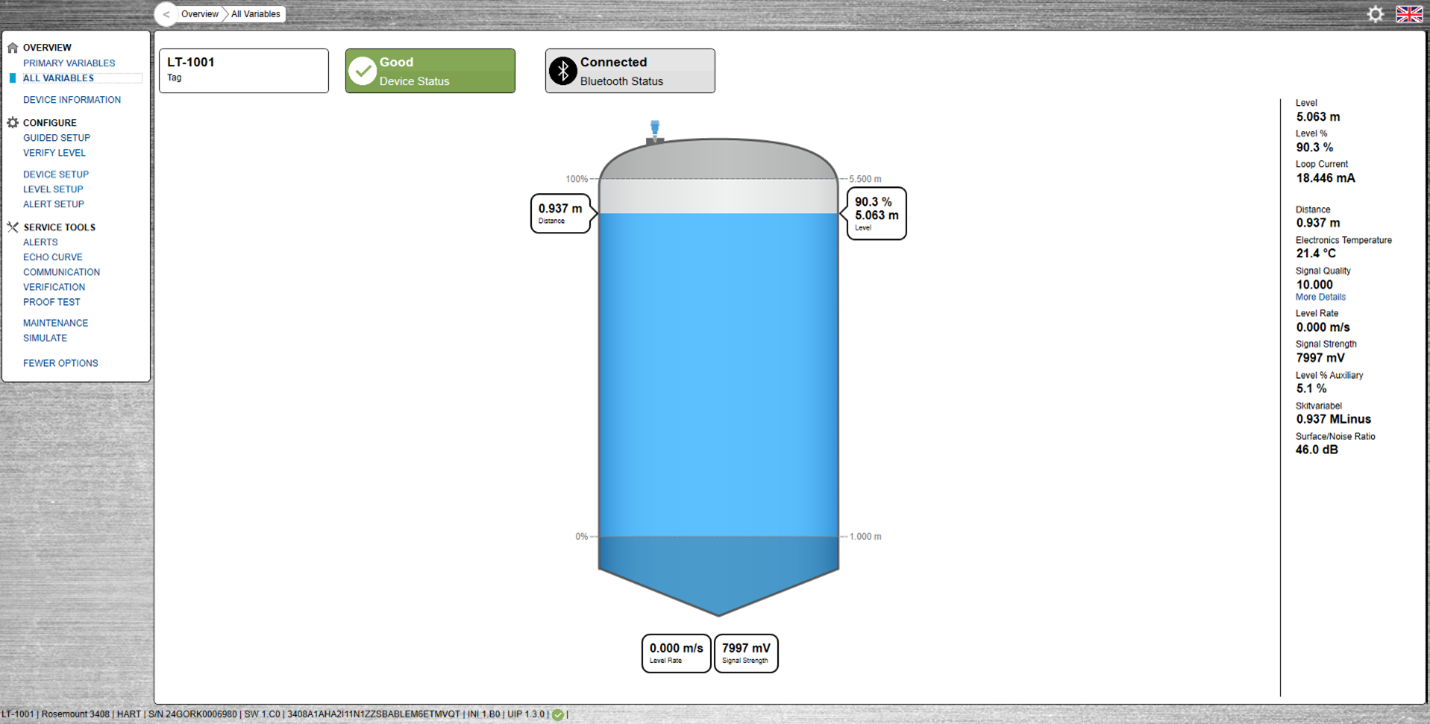
With Device View, AMS Device Manager users can unlock powerful browser-based field device management. With its intuitive dashboards, Device View gives maintenance and reliability teams instant access to real-time device health, calibration status, and project data from anywhere with network connectivity— out of the box with no local software installation needed. This flexibility streamlines maintenance planning, device troubleshooting, and regulatory documentation, promoting greater automation asset reliability and operational efficiency plant wide.
Bulk Configuration
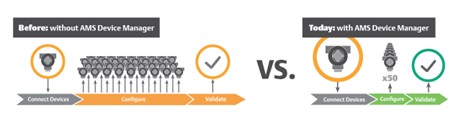
Device configuration is typically an extremely time-consuming process—particularly when teams need to manually apply the same configuration to many devices of the same type, one-by-one.
AMS Device Manager’s Bulk Transfer Utility empowers users to leverage templates to streamline commissioning, speeding the process and reducing human error. Before commissioning field devices, users create templates, defining parameters for multiple devices, then set configurations to follow a pre-defined standard. Using these templates to configure devices in bulk, commissioning can be completed in a fraction of the time that is required with traditional methods. Typical savings range from 80-90% less time required — with fewer configuration errors.
FDI device packages
AMS Device Manager also supports Field Device Integration (FDI), an international standard developed to make integrating, configuring, and managing field devices much easier for modern process automation systems. Instead of multiple driver files and custom software for every new intelligent device, FDI provides a single, digitally signed package with everything the host system needs—device descriptions, user interface for advanced diagnostics and documentation.
AMS Device Manager is FDI-certified, meaning it can use FDI Device Packages to interact with the full spectrum of smart device features. This simplifies plant management, speeds configuration and troubleshooting, and ensures compatibility as new devices are deployed.
Easy synchronization with AMS Trex
Auto Sync connects the AMS Trex Device Communicator directly to the AMS Device Manager database, ensuring every change made in the field is recorded, time-stamped, and instantly available for device management and audit. Any adjustments, or configuration updates performed by technicians using an AMS Trex communicator are automatically captured and uploaded to AMS Device Manager in real time—when connected via Wi-Fi or USB—or as soon as network connectivity is restored. Field changes—even those made offline—are reliably cached for later delivery, ensuring nothing gets lost or forgotten.

Simplify smart device connectivity with HART-IP
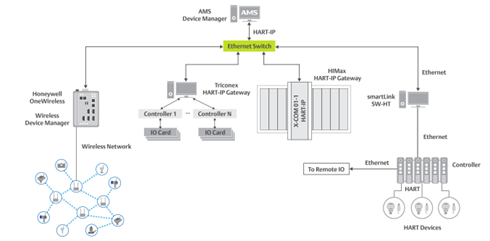
AMS Device Manager’s HART-IP interface lets reliability teams more easily integrate systems. With HART-IP, AMS Device Manager can natively integrate and manage HART devices across a wide range of third-party control and safety platforms (including TriconCX, HIMA HIMax, Honeywell OneWireless, Phoenix Contact, Softing smartLink, FB3000, Siemens ET200, Allen-Bradley, and more). This open, direct interface means:
- No need for extra hardware multiplexers or protocol converters—reducing cost, complexity, and space requirements.
- Full remote access: Diagnostics, configuration, and calibration of HART-enabled devices can be done anywhere in the plant through existing IP infrastructure.
- Seamless scaling: One AMS Device Manager license supports up to 16 HART-IP gateways per network interface, making large installations simpler to expand and manage.
Critical calibration assistance
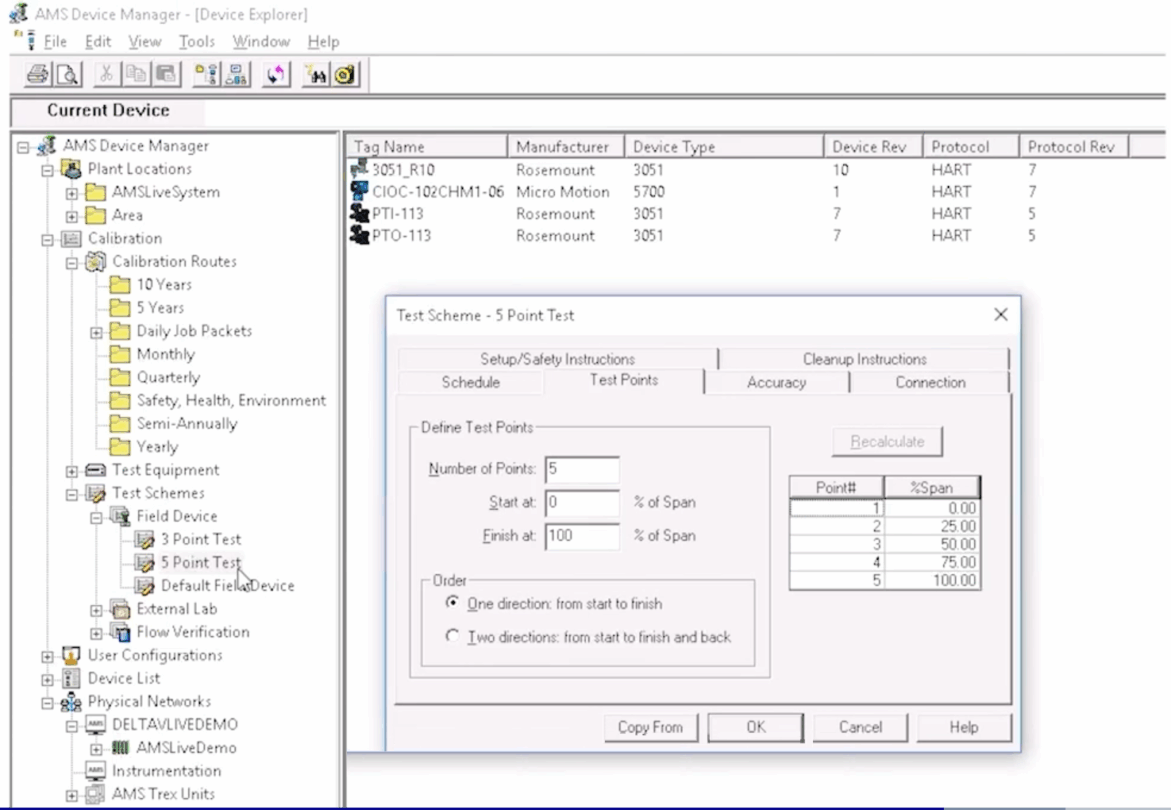
Calibration Assistant is a powerful SNAP-ON application for AMS Device Manager that revolutionizes how maintenance and engineering teams manage calibration tasks. Purpose-built for plants utilizing smart instrumentation and control systems like DeltaV, it simplifies the entire calibration workflow—from test scheduling and data acquisition to certification and audit trail reporting.
Take reliability to the next level, today
Making the most of your technology investments means taking advantage of every feature you can use. By exploring these and other options available today in the current version of the software, you can not only drive improved return on investment but also increase operational excellence across your facility—or even your enterprise!