
Alarm management does not have to be complicated. At the Ovation Users’ Group Conference, Emerson’s Sarah Morgan, an Ovation Automation Platform Instructor, walked control system engineers through the point-level settings that separate a noisy alarm list from one operators can trust.
Why It Matters
Every extra alarm competes for an operator’s attention, and a flooded list buries the one message that actually matters. Standards such as ANSI/ISA 18.2 and IEC 62682 give you a framework, but the day-to-day work happens in the point configuration inside Ovation Developer Studio.
Sarah’s core message is practical: most of your alarm reduction comes from a handful of settings you already have. Getting those settings right protects operators, improves response, and keeps your Ovation power plant control system running as designed.
Key Takeaways
- Analog points with limits built directly on the point deliver richer alarm messages than logic-driven digital indicators, including current value, quality, and the limit that was crossed.
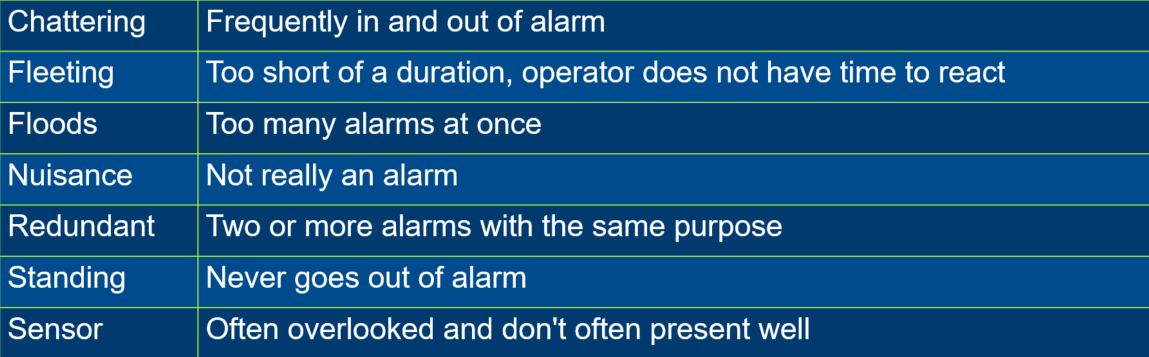
- Nuisance alarms fall into recognizable categories: chattering, fleeting, floods, redundant, standing, and sensor alarms.
- Simple database levers such as alarm delay, return delay, and deadband can cut alarm frequency by roughly 80 percent.
- Cutouts suppress alarms that mean nothing in a given process state, such as low-level alarms on an empty tank when the pump is off.
- Reconcile before loading a controller so live tuning is not overwritten by the database.
- A static pass built from one month of historian data gives you the baseline you need before deeper rationalization.
How Ovation Points Alarm
Sarah opened with a review of the point types and how each can alarm. Digital points can alarm on zero or one, or on a specific zero-to-one or one-to-zero transition, which is common for sequence-of-events points. State change status checking is worth knowing: it sends a message to the alarm history without creating an active alarm the operator must acknowledge and reset. Packed points, often used with programmable logic controllers or Simple Network Management Protocol monitoring of network equipment, can alarm on individual bits.
Analog points carry the most configuration depth. You get High 1 through 4 and Low 1 through 4 limits, plus user-defined limits, and each limit can hold its own priority. Sarah recommends avoiding making every limit priority one, so operators can read severity at a glance. Incremental limits add better and worse notifications as a value drifts away from or back toward its normal range. Sensor alarms, meanwhile, tell you when a device is reading outside its rated range, such as a 4 to 20 milliamp transmitter dropping below 4 milliamps, and they push the point into bad quality.
The recurring theme: build alarm limits on the analog point itself rather than through high- or low-monitor logic. Both approaches work, but the analog point puts the reading, the quality, and the crossed limit right in the message instead of a bare indicator that only says a tank is low.
Spotting the Bad Actors
Before fixing anything, name the problem. Sarah defined the nuisance alarm types engineers should hunt for. Chattering alarms cycle in and out repeatedly. Fleeting alarms appear too briefly to act on. Floods bury useful information under volume. Redundant alarms tell you the same thing twice, like a low-level alarm and a priority raise state that both signal one condition. Standing alarms never clear, sometimes sitting untouched since commissioning. Each type points toward a specific configuration fix.
Configuration Levers That Do the Heavy Lifting
This is where most of the value lives. An alarm delay time requires a condition to persist for a set number of seconds before it posts, which tames fleeting spikes. A return delay time, often set to around 30 seconds across the board, smooths the up-and-back cycling that drives chattering. Deadbands cover similar ground by requiring the value to move a set distance back into the normal range before a return counts.
Cutouts take more process knowledge but pay off. By referencing the true or false state of another point, you can mask alarms that carry no meaning in a given state. Sarah’s training example is the empty tank whose level transmitters sit in low alarm whenever the pump is off. Use the pump status as a cutout, add a short delay so the tank can fill, and those junk alarms disappear until they matter again.
Two more settings add context rather than reduce count. Alarm description gives the point a second, operator-facing description that explains why it is in the list. Alarm guidance adds five fields of response steps, reachable from a right-click menu, so the operator knows exactly what to do. A newer re-alarm time re-flags an acknowledged but unresolved alarm after a set period, forcing a second look.
One caution runs through all of this. Changes made from operator applications go straight to the controller, but the database does not know about them. Reload without reconciling and your tuning is gone. Reconcile first, keep what you want, then load.
Building a Baseline and Standardizing
Sarah framed improvement as an 80/20 effort. A static pass gets you most of the way for a fraction of the work: pull a month of alarm data from the historian, export it to a spreadsheet, and calculate alarms per hour and per point to find your bad actors. From there, apply the database levers, establish cutouts for not-in-service and startup states, and standardize set-and-reset descriptions, abbreviations, and priorities.
A quality alarm, by the standards’ definition, is abnormal, actionable, has a real consequence, stays relevant to the current process state, and is unique. Settings that push your list toward those five traits are the ones worth rolling out.
Learn More
To see how Ovation supports operators and configuration engineers across the plant lifecycle, explore the Ovation Automation Platform section on Emerson.com.