
At the 2026 Ovation Users’ Group Conference, Emerson’s Tom Chorba, Instructor in Emerson’s Power and Water business, walked attendees through the highlights of the Ovation 4.0 release. His session focused less on what is in the release flyer and more on day-to-day changes for the engineers who build, maintain, and troubleshoot Ovation systems.
Why It Matters
For teams running Ovation as their power plant control system or for water and wastewater operations, a major release affects lifecycle planning, engineering effort, and troubleshooting. Ovation 4.0 moves the platform onto current Microsoft operating systems and database technology with long support horizons. It also delivers a long list of small engineering improvements that remove repetitive clicks and workarounds. Together, these changes reduce risk and save time throughout the system’s life.
Key Takeaways
- Ovation 4.0 supports Windows Server 2025, Windows 10 LTSC 2021, and Windows 11 LTSC 2024, and raises capacity to 750,000 process points.
- Microsoft SQL replaces Oracle as the Ovation database, giving single-vendor support for the operating system and database.
- The new Ovation View HMI is an HTML5 graphics package that runs alongside legacy graphics, so migration can happen gradually.
- Developer Studio, alarm, trend, and System Viewer updates remove many everyday engineering challenges.
- New controller options include the OMC100 Micro Controller with integrated I/O and the SDC100 Software-Defined Controller.
Frequently Asked Questions
Ovation 4.0 runs on Windows Server 2025, Windows 10 LTSC 2021, and Windows 11 LTSC 2024. It replaces Oracle with Microsoft SQL as the database and raises capacity from 500,000 to 750,000 process points. It also adds the new Ovation View HMI graphics package, the OMC100 and SDC100 controllers, and many updates to Developer Studio, alarms, trends, and System Viewer.
With Microsoft SQL, one vendor supports both the operating system and the database. Ovation applications and support scripts stay the same, and the database had already been proven in the Ovation Stand-Alone Controller Toolkit. Day-to-day operation looks unchanged. A new caching approach also gives faster workstation drop clears, lighter database load, and stronger data integrity checks.
Yes. Legacy graphics and Ovation View HMI displays can run side by side and link to each other, so plants can convert one unit at a time. There is currently no automated batch conversion tool. View HMI is included with Ovation subscriptions for new systems and Evergreen Plus. Perpetually licensed systems need a separate paid license.
Ovation 4.0 supports the OCR1100, OCR3000, OCC100, and virtual controllers. It also adds two new options. The OMC100 Micro Controller has 32 configurable I/O channels for small-footprint applications. The SDC100 Software-Defined Controller lets several controllers run on one VMware host, each with OCR3000 point capacity.
Platform Changes You Won’t Notice, and Why That’s the Point
Tom explained that Ovation 4.0 supports Windows Server 2025, with an expected end of life in October 2035, along with Windows 10 and Windows 11 Long-Term Servicing Channel (LTSC) releases. Controllers and smart modules run VxWorks 7.24.03. The process point limit rises from 500,000 in version 3.8 to 750,000, and the system supports the 2038 Unix time epoch.
The biggest under-the-hood change is the move from Oracle to Microsoft SQL. Tom said he has used 4.0 for about a year and never noticed a difference. Ovation applications and support scripts stay consistent; the database was previously proven in the Ovation Stand-Alone Controller Toolkit, and Microsoft now supports both the operating system and the database.
Database distribution also changed. Multicast transport is no longer used. Instead, a server-side cache is generated from the SQL database and read by workstations into a client-side cache. The result is faster workstation drop clears, reduced database load, fewer network spikes, and stronger data integrity, with each cached point carrying hash-based message authentication code (HMAC) verification. Tom noted that day-to-day operation looks the same, though troubleshooting distribution issues will look a little different.
New 64-bit integer and double-precision analog record types handle very large values, such as SCADA or third-party points. Tom was clear that they are not interchangeable with standard analog points and will not improve resolution on a thermocouple. Ovation 4.0 also works on networks alongside versions 3.6, 3.7, and 3.8. Because Windows 11 and Server 2025 no longer show third-party patches in the Control Panel, a new Ovation Patch Manager shows installed patches and their details on each workstation.
Ovation View HMI: A New Way to Build Graphics
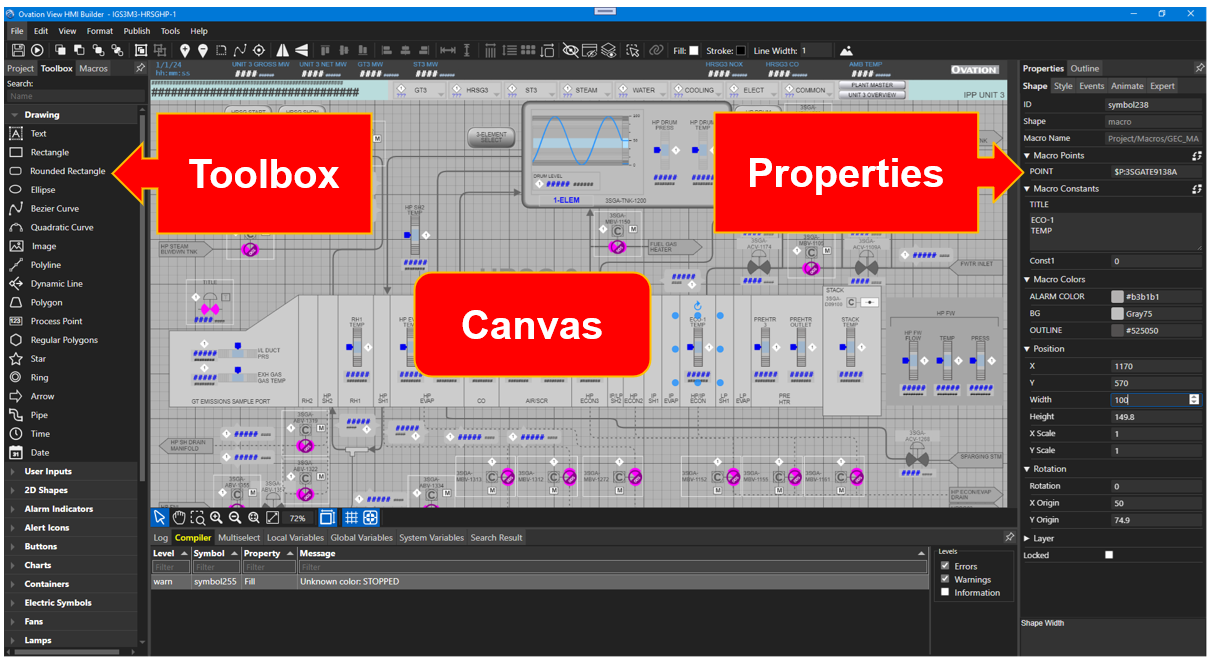
Ovation View HMI is the next-generation graphics package, built on HTML5 web applications. Its builder offers a toolbox of 2D and 3D widgets, charts, and key performance indicators (KPIs), a central canvas, and a properties panel that shows every setting for the selected object. Conditional color and text changes are written directly in that panel, with no separate syntax editor. Built-in search, backups, macros, localization, and remote monitoring through Data Hub are included.
Legacy graphics and View HMI displays can run together and link to each other, so plants can convert one unit at a time. Tom noted there is currently no automated batch conversion tool. View HMI is included with Ovation subscriptions for new systems and Evergreen Plus, and requires a separate paid license for perpetually licensed systems.
Engineering, Operator, and Controller Enhancements
Many updates target everyday friction. In Developer Studio, toolbar searches run immediately, search results include a delete checkbox, saved searches can be edited, and points referenced on graphics can be deleted with an override. Configuration tabs now sit on the left side, which Tom said matters most to anyone who has worked through the more than 20 tabs in the alarm configuration file. Database import and export now happen with a right-click instead of the command prompt.
Alarm limits can each have their own delay time, and alarm summary groups double from 32 to 64. Users can define up to 10 custom live trend durations that follow them across workstations. System Viewer now refreshes after a drop load without collapsing the hierarchy, so troubleshooters keep their place.
On the controller side, Ovation 4.0 supports the OCR1100, OCR3000, OCC100, virtual controllers, the OMC100 with 32 configurable I/O channels for small-footprint applications, and the SDC100, which allows multiple software-defined controllers on one VMware host with OCR3000 point capacity. Embedded Ethernet driver limits rise to 64,000 points, and Foundation Fieldbus modules on the OCR3000 increase to 72. Controllers now support a user-defined shared secret for Secure Shell (SSH) connections, which are disabled by default. Updated remote node controller hardware restores RNC compatibility with the OCR3000, and new software-defined I/O modules are configured channel by channel.
Learn More
Learn more about the Ovation Automation Platform 4.0, software-defined automation that drives innovation for smarter, more efficient power and water industry operations.

